
If you’re running an ongoing or multi-date group class, Heallist makes it easy to add additional session dates without creating a new service. This allows clients to continue booking the same class while keeping all sessions organized in one place.
Follow the steps below to add more dates to an existing group class.
Adding Additional Dates to a Group Class
-
Go to your Heallist Profile and locate the group class you’d like to update.
-
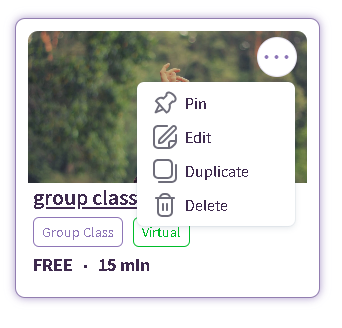
Click the three-dot menu (⋯) in the top-right corner of the service card, then select Edit.
-
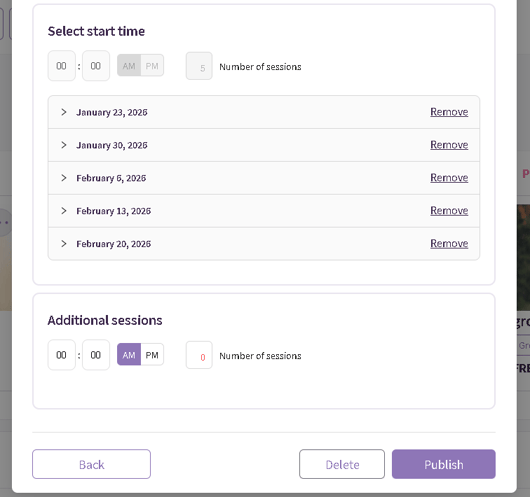
In the Edit Service Timing section, scroll to Additional Sessions.
-
Enter the start time for the new sessions
-
Specify the number of sessions you’d like to add
-
-
Publish your changes
Once the additional dates are added, click Publish to update your service page.
The newly added dates will immediately appear on your group class listing and be available for booking.
Helpful Tips
-
This is ideal for recurring classes or series extensions.
-
Existing bookings are not affected when you add new dates.
-
Always remember to click Publish—changes won’t appear on your profile until you do.
If you need help managing group classes or have questions about scheduling, please reach out via live chat or visit our Support Center.