
We’re excited to introduce the Gift Cards feature on Heallist, a new way for practitioners to make their services more shareable—and for clients to gift meaningful sessions to others with ease.
Gift Cards are simple to use, flexible for clients, and seamlessly integrated into your existing Heallist setup.
What Are Heallist Gift Cards?
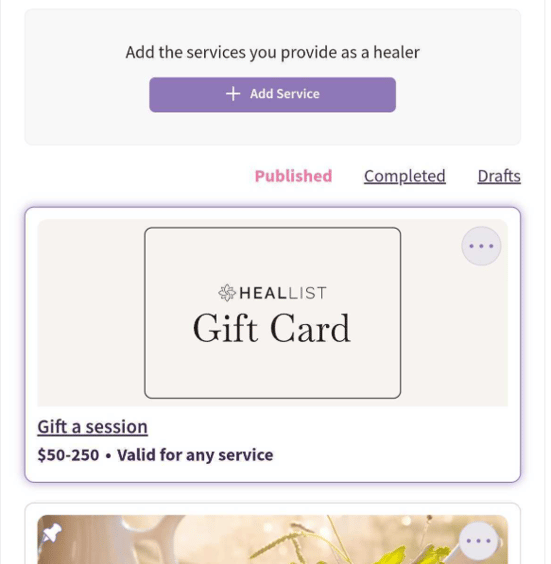
Gift a Session allows clients to purchase a Gift Card for a specific practitioner directly from their Heallist profile.
When a Gift Card is purchased:
-
A one-time-use code is created for the exact gift amount
-
The code can be used on any service offered by that practitioner
-
Payment goes directly to the practitioner through their existing Stripe or PayPal connection
Heallist does not hold funds or issue stored balances. Gift Cards work by applying the value of the gift at checkout, just like a discount or credit.
Using Gift Cards for Higher-Priced Services
Gift Cards can be used partially toward services that cost more than the original gift amount. If a service exceeds the Gift Card value, the remaining balance can be paid at checkout using the client’s preferred payment method.
Heallist automatically keeps track of how much of the Gift Card has been used. If there is unused balance remaining, it can be applied to a future session with the same practitioner until the full amount is redeemed or the gift card expires.
Who Can Offer Gift Cards?
The Gift Cards feature is automatically available once all of the following are in place:
-
You have an active Empowered subscription as a practitioner in Heallist
-
A connected and verified Stripe or PayPal account
-
At least one published, active service
If any of these requirements change, the Gift Card option will be hidden from public view.
Gift Card Options for Clients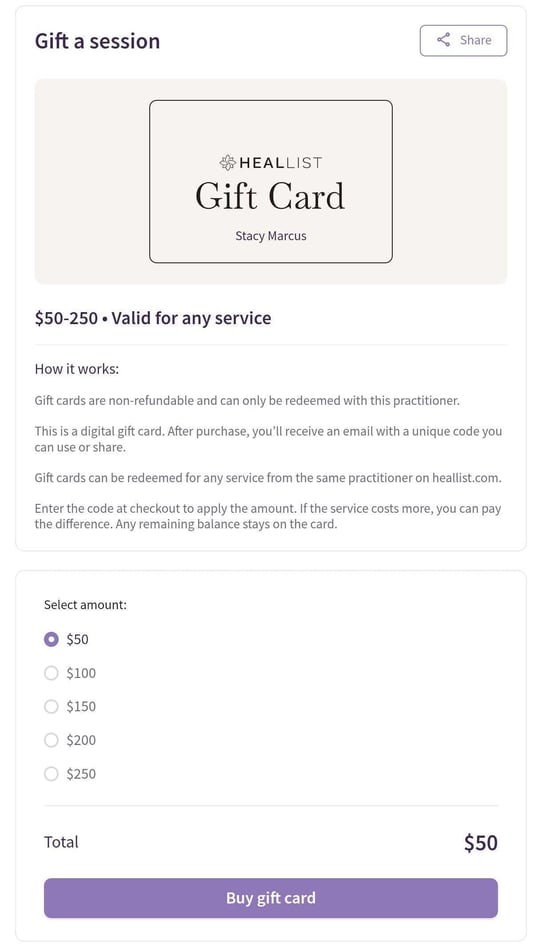
Clients can choose from the following preset amounts:
-
$50
-
$100
-
$150
-
$200
-
$250
Sharing a Gift Card with the Recipient
After purchasing a Gift Card, the buyer is responsible for sharing it with the intended recipient.
You can share the gift in any of the following ways:
-
Download and print the attached PDF gift certificate
-
Email the PDF certificate to the recipient (which you can manually send the email to the recipient)
-
Forward the confirmation email, which includes the gift code and redemption instructions
NOTE: Heallist does not send the gift directly to the recipient. You can manually forward email the gift certificate once you receive it on the email address connected to your Heallist account.
How Gift Cards Are Used
To redeem a Gift Card, the recipient simply:
-
Visits the practitioner’s Heallist profile
-
Chooses any available service
-
Enters the gift code in the Promo Code section on the individual service booking page
Each Gift Card can be used multiple times, on multiple services and is valid for up to 12 months from the purchase date.
What Practitioners See in Their Bookings page
Bookings
When a Gift Card is used, it appears clearly within the booking details so practitioners can easily see that a gift was applied.
Billing
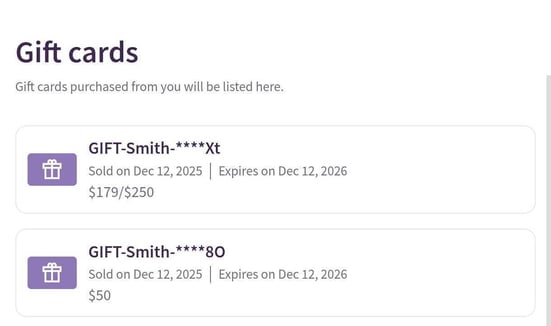
A new Gift Cards section is available on the Billing page, where practitioners can view:
-
Who purchased the gift
-
The gift amount
-
When it was sold
-
When it expires
-
Whether it has been used or not
- Remaining balance (if used partially)
This makes it easy to track outstanding and redeemed gifts at a glance.
What Clients See in Their Bookings page
Clients who purchase Gift Cards can view them on the Purchases page in their account, including:
-
The practitioner’s name
-
Gift amount
-
Purchase and expiration dates
-
Gift status (unused or redeemed)
-
An option to share the gift
Important Things to Know
-
If a Gift Card purchase is refunded, the associated gift will no longer be valid.
-
If a practitioner temporarily stops offering services, Gift Cards are hidden from public purchase—but already issued gifts still work.
-
Practitioners can hide the Gift Card option at any time without affecting previously purchased gifts. Click the 3 dots on the top right corner of the Gift Card image and select "Hide"
Why Offer Gift Cards?
Gift Cards help you:
-
Attract new clients through referrals
-
Offer an easy gifting option for holidays and special occasions
-
Increase visibility without changing how you run your practice
If you have questions or need help getting started, reach out via live chat from your Heallist dashboard or visit our Support Center.