
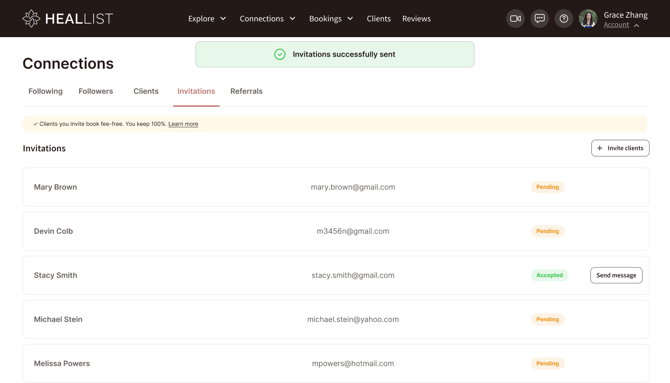
The Invite your clients feature lets you bring the clients you already work with onto Heallist, so they can book and pay you directly on the platform.
Who to invite
This is for real clients you already work with — people who know you and expect to hear from you. It's not a mailing list or a way to reach cold contacts. Sending invites to people who don't already work with you leads to spam complaints and hurts everyone's email delivery, so please only invite your own clients.
You can only invite people who don't already have a Heallist account. If an email address is already registered, the invite won't send. Anyone can end up on Heallist on their own — through search, a link, or the marketplace — and once they have an account, they can't be added as an invited client.
How to invite
Go to Connections → My Clients and choose Invite clients.
- Add up to 10 email addresses at a time. This limit keeps invites from looking like spam and protects delivery.
- You can invite up to 100 clients total.
Invite Limits
To help ensure a positive experience for everyone using Heallist, client invitations are currently subject to sending limits.
These limits are in place while we continue improving the feature and monitoring usage. As the Invitations feature evolves, we plan to expand these limits and introduce additional flexibility.
Stay tuned for future updates as we continue enhancing practitioner communication tools.
What your client receives
Your client gets an email from "[Your name] via Heallist," which you can personalize before sending. It invites them to view a specific service or your profile page.
The link in the email is unique to that client. It carries your referral code and matches their email address, so when they book, the booking is connected to you automatically. The simplest path for your client is to book straight from the email — then everything is linked without them having to do anything.
Track your invitations
You can see the status of every invite on your My Clients page — who's been invited, and who has joined and booked.
Fees
On the Essential plan:
- Clients you invite → no 10% booking fee, ever
- Clients who find you on Heallist → 10% booking fee on every booking
This is set when the client creates their account and doesn't change later.
Important: for the invite to count, your client needs to sign up with the email address you invited, or enter their invitation code. Both are filled in automatically when they click the link in the invite email, so the easiest thing is to tell them to sign up from that email. If they sign up with a different email and no code, we have no way to connect them to your invitation, and the 10% fee will apply.
Clients who joined before August 5, 2026: this doesn't apply to them. The 10% fee still applies on Essential. We know that's frustrating if you brought your own clients onto Heallist earlier — we simply don't have the data to tell which of those clients came from you and which found us on their own, so we can't apply the new rule fairly.
On the Empowered plan there's no 10% fee on any booking. You can upgrade at any time from your Billing page, to avoid any fees https://app.heallist.com/billing
Stripe and PayPal processing fees apply to every booking. Those are charged by the payment processor, not by Heallist.
More Email Automations Coming Soon
We're actively working on expanding Heallist's digital tools with more email automations and customization options to help you stay connected with your clients throughout their healing journey.
FAQ
Does the Invite Clients feature replace my email marketing or CRM platform?
Not completely. This feature is designed to help you bring your existing clients onto Heallist so they can easily book sessions, receive reminders, manage appointments, and access their client account.
If you already use an email marketing platform (such as Mailchimp, ConvertKit, Flodesk, or Kit) or a dedicated CRM, you'll likely want to continue using those tools for:
- Newsletters
- Marketing campaigns
- Promotional emails
- Audience segmentation
- Sales funnels
- Advanced email automations
Heallist focuses on practice management and client experience, including bookings, payments, reminders, messaging, and practitioner-client communication. As the platform continues to grow, we'll be introducing additional communication features and automations to further support your practice.
Questions?
If something doesn't look right — for example, a fee you didn't expect — email support@heallist.com and we'll help.