
The Attendees feature lets one client book a service for themselves and the people they want to bring, whether that's a partner, a parent, or a few friends, and pay for everyone in a single booking instead of booking separately or messaging you to work it out.
Where it works
Attendees works on private sessions and group classes. It isn't available for retreats, workshops, or transmissions. You may also notice we've renamed 1:1 sessions to private sessions, since they're not always one to one anymore.
Private sessions vs. group classes
The difference comes down to who else can be in the room.
- Private session: only your client and the people they add. Nobody else can book into that time. If a client books a private session for herself and her partner, that's the whole session.
- Group class: your client and the people they add join everyone else who booked the class. Each person takes one spot from your class capacity, so if your class holds 12 and a client books for 3 people, there are 9 spots left for others.
How to turn it on
The feature is off until you turn it on, so none of your current services change unless you choose to.
- Go to Add service, or open an existing private session or group class and choose Edit service.
- On the first screen, find Rates.
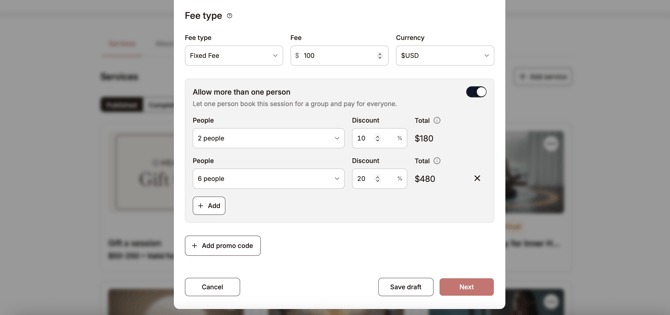
- Turn on Allow more than one person.
- Choose a Group size from the dropdown, for example 2 people.
- Enter a Discount if you want to offer one, or leave it at 0.
- Click + Add to add another group size, and repeat.
- Save your service.
The largest group size you add becomes the maximum number of people a client can book for. You'll see it confirmed under your group sizes, for example "up to 10 people." To remove a group size, click the X next to it.
Discounts are optional
You don't have to offer a discount. If you leave the discount at 0, each person simply pays the full price of your service, so a $100 session booked for 3 people costs $300. You still need to add at least one group size, since that's how you set the maximum.
If you do want to reward bigger bookings, enter a percentage next to any group size. The discount applies to the full booking total, and the Total column shows you exactly what the client will pay.
Example from the screenshot: $100 session
- 2 people, no discount: $100 × 2 = $200
- 10 people, 10% off: $100 × 10 = $1,000, minus 10% ($100) = $900
- Clients can book for up to 10 people.
Example: private session at $120 per person with three group sizes
| Group size | Full price | Discount | Client pays | Per person |
|---|---|---|---|---|
| 2 people | $240 | 0% | $240 | $120 |
| 4 people | $480 | 10% (−$48) | $432 | $108 |
| 6 people | $720 | 15% (−$108) | $612 | $102 |
Here the maximum is 6 people, since that's the largest group size added. A group of 3 gets no discount and a group of 5 gets 10% off.
A quick note before you set discounts: think about whether another person makes your session easier or harder. In a class, one more person usually doesn't change much. In a private session, working with two people can take more from you, not less, and it's completely fine to charge full price per person.
What you'll know about attendees
Heallist only collects details for the client who books. We don't collect names, emails, or any other information for the people they bring, and the client is responsible for sharing the session details and any video link with them. If you need intake forms or consent from everyone attending, ask your client to have each person reach out to you before the session.
FAQ
Will this change my existing services?
No. Only services where you turn on Allow more than one person will show the Attendees option to clients.
Can I use it on retreats, workshops, or transmissions?
Not at the moment. It's available for private sessions and group classes only.
Do I have to offer a discount?
No. Discounts are optional. Leave the discount at 0 and everyone pays your regular price.
Questions?
If something doesn't look right, email support@heallist.com and we'll help.