
Some practitioners on Heallist let you book a service for yourself and the people you'd like to bring along, like your partner, a family member, or a few friends, and pay for everyone in one booking. If a service allows this, you'll see an Attendees field on the booking page.
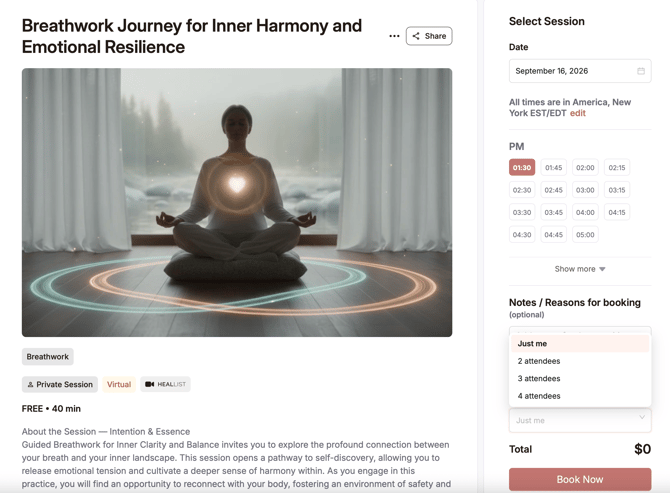
How to book for more than one person
- Open the service you want to book.
- In the Attendees field, choose how many people are coming: Just me, 2, 3, 4, and so on. Each practitioner sets the maximum group size for their service.
- Check the price. It updates to show the total for everyone, including any group discount.
- Choose your date and time and complete your booking.
You pay for everyone in one payment, and the booking is under your account.
Private sessions vs. group classes
- Private session: it's just you and the people you add. No one else will be joining.
- Group class: you and the people you add will join others who booked the same class. Each person takes one spot, so the number of people you can bring also depends on how many spots are left.
Group discounts
Some practitioners offer a lower price for bigger groups, and others don't. If there's a discount, it's applied automatically to your total once you choose enough people.
For example, if a session costs $120 per person and the practitioner offers 10% off for 4 people:
- Full price for 4 people: $120 × 4 = $480
- 10% discount: $480 × 0.10 = $48
- You pay: $480 − $48 = $432, which works out to $108 per person
Share the details with the people you're bringing
When you book for a group, Heallist only has your details. We don't collect names or email addresses for the people you add, so they won't get a confirmation email or reminders from us. It's up to you to let them know when and where the session is happening.
- In-person sessions: share the date, time, and location with everyone joining you.
- Virtual sessions: your link to join is in your confirmation email, and you can also find it in your account under Account → Bookings → Session details. Send that link to everyone joining you so they can get in.
Don't see the Attendees field?
That means the practitioner hasn't turned it on for that service, so it can only be booked for one person. You can message the practitioner to ask whether they'd consider it.
Questions?
Email support@heallist.com and we'll help.